
Can You Use a Travel eSIM as a Hotspot? iPhone and Android Tethering, Provider Caps Compared (2026)
Yes. Personal Hotspot on iPhone and Hotspot & tethering on Android work with a travel eSIM as long as the eSIM is the line selected for cellular data; Apple's own wording is that Personal Hotspot uses the line selected for cellular data. YonoSIM allows hotspot on every plan with no separate allowance. Airalo, Nomad, Saily and Ubigi allow it too; Holafly caps sharing at 500 MB–1 GB a day on its unlimited plans. Here are the exact menus, the APN fix when the option is greyed out, and how to stop a laptop eating the plan.

Published November 3, 2026·7 min read
30-day auto-refund on no usageSummary
Yes, a travel eSIM can be shared as a hotspot on iPhone and Android, exactly like a physical SIM, as long as the eSIM is the line selected for cellular data. That condition is Apple's own: “Instant Hotspot and Personal Hotspot use the line selected for cellular data.” Every YonoSIM plan allows hotspot, with no separate sharing allowance; tethered devices draw from the same data bucket.
Among other providers, Airalo, Nomad, Saily and Ubigi allow it on all plans, while Holafly caps sharing at 500 MB to 1 GB a day on its unlimited plans. When the hotspot option is greyed out, the fix is the Personal Hotspot APN field, not a new eSIM.
Why hotspot works with an eSIM
A hotspot is the phone sharing whichever cellular connection it is using for data. The eSIM is a full SIM profile stored on a chip instead of plastic, so the phone treats it as a line like any other. Google's Android help says most Android phones can share mobile data by Wi-Fi, Bluetooth or USB, and adds the one caveat that matters: carriers may limit tethering or charge extra. For a travel eSIM the “carrier” is the eSIM provider, so the only question is the provider's policy, covered below.
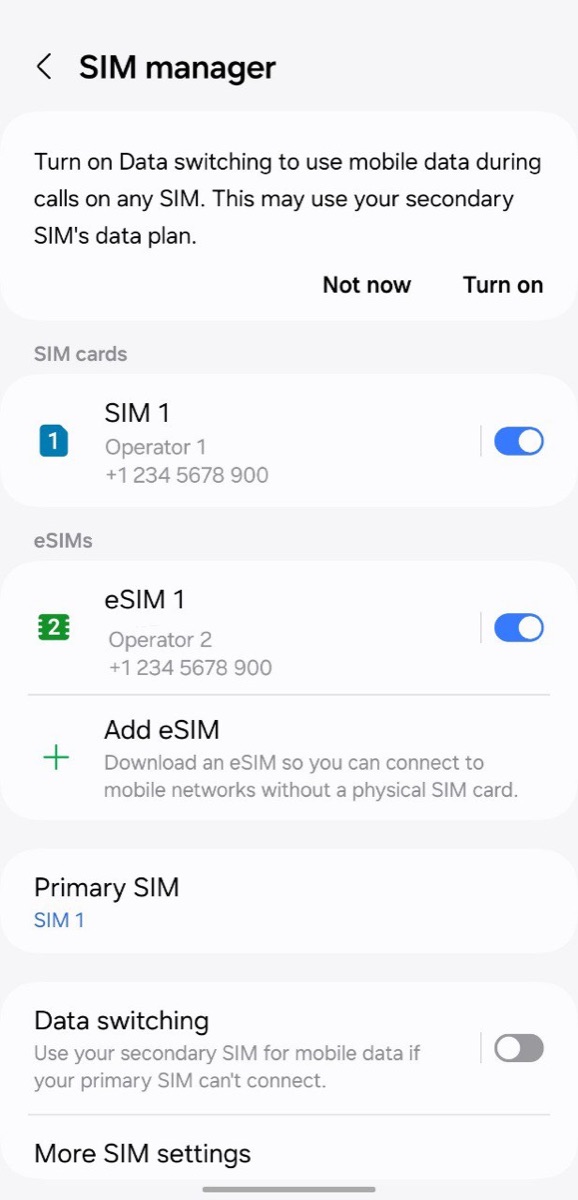
The thing that trips people up is dual SIM. A phone carrying a home SIM and a travel eSIM shares only one of them, and it is the one chosen as the data line. Share the wrong one and the laptop is roaming on the home plan at day-pass rates while the eSIM sits idle.
How to hotspot a travel eSIM on iPhone
- Open Settings, tap Cellular, then Cellular Data, and select the travel eSIM.
- Back in Settings, tap Personal Hotspot (also under Cellular). First-time users see Set Up Personal Hotspot.
- Turn on Allow Others to Join. Apple recommends a password of at least eight characters.
- On the laptop, join the Wi-Fi network named after your iPhone. Macs, iPads and other devices on the same Apple Account connect through Instant Hotspot without step 3.
iPhone
Settings › Personal Hotspot
Uses the data line
Apple: “Instant Hotspot and Personal Hotspot use the line selected for cellular data.” Set the travel eSIM as the data line first, or the hotspot shares your home SIM at roaming rates.
Those are the steps on Apple's Personal Hotspot page, which also notes that the number of devices that can connect depends on the carrier and iPhone model, and that the feature is not available with all carriers. The dual-SIM sentence is from Apple's Using Dual SIM with an eSIM article. Maximize Compatibility, a toggle on the same screen, helps older laptops and some hotel-room devices find the hotspot; Apple warns it may reduce performance, so leave it off unless a device cannot see the network.
How to hotspot a travel eSIM on Android
- Open Settings, tap Network & internet, then SIMs, and select the travel eSIM for mobile data.
- Go to Network & internet › Hotspot & tethering and tap Wi-Fi hotspot.
- Set the name and password, then switch it on. Turn off Data Saver if the toggle refuses.
- For a wired connection, plug in the cable and choose USB tethering instead. Google notes Macs cannot tether to Android over USB; use Wi-Fi for a Mac.
Google Pixel
Settings › Network & internet › Hotspot & tethering
Data Saver off first
Google: Data Saver must be off to tether over Wi-Fi, up to 10 devices can join, and the hotspot can switch itself off when nothing is connected.
From Google's Pixel hotspot page: up to 10 devices can join, there is a “Turn off hotspot automatically” option for when nothing is connected, and Google's advice is to plug both devices in while tethering because it drains batteries fast. Samsung Galaxy phones put the same controls under Settings › Connections › Mobile Hotspot and Tethering.
Hotspot greyed out or missing: the APN fix
When Personal Hotspot is missing from Settings, or the toggle is greyed out, on a travel eSIM that otherwise works, the cause is nearly always one of three things, and all three are fixed in Settings:
| Cause | Check | Fix |
|---|---|---|
| eSIM is not the data line | Settings › Cellular › Cellular Data shows the home SIM | Select the travel eSIM. Hotspot follows the data line |
| Cellular data off for the eSIM | Tap the eSIM line; Turn On This Line and cellular data are both enabled? | Enable both, then toggle Airplane Mode on and off |
| Personal Hotspot APN empty | Settings › Cellular › the eSIM line › Cellular Data Network: the Personal Hotspot section is blank | Type the same APN as the top section, lower case, username and password blank. The APN for a YonoSIM plan is printed on the order page |
iPhone
Settings › Cellular › (travel eSIM) › Cellular Data Network
The greyed-out fix
If Personal Hotspot is missing or greyed out on a travel eSIM, copy the APN from the top section into the Personal Hotspot APN field, lower case, nothing else filled in.
iPhones set the APN automatically for almost every travel eSIM, which is why the Cellular Data Network screen is often hidden; it only appears for lines whose carrier allows manual entry. On Android the APN is more often needed for data itself, not just hotspot. The step-by-step for that, including the Save menu most people miss, is in our support centre under “I have signal but no internet.”
Which eSIM providers allow hotspot
| Provider | Hotspot allowed? | Cap on sharing | Source |
|---|---|---|---|
| YonoSIM | Yes, every plan | None; tethered data comes out of the plan's bucket like any other data | support centre |
| Airalo | Yes, if the device and network support it | None on standard plans; on unlimited plans tethered data counts toward the daily full-speed allowance | Airalo help |
| Holafly | Yes, all travel plans | 500 MB to 1 GB a day depending on destination (its FAQ says up to 1 GB; some destination pages say 500 MB). Monthly Plans Unlimited tier: unlimited sharing | Holafly FAQ |
| Nomad | Yes | None stated; stability may vary by device and network | Nomad help |
| Saily | Yes, all plans | None on standard plans; unlimited plans give 5 GB a day at full speed, hotspot included, then 1 Mbps | Saily |
| Ubigi | Yes | Tethering allowed with no restrictions; APN must be registered first on iPhone | Ubigi help |
The pattern: capped-data plans share freely, because a gigabyte is a gigabyte whichever screen it lands on. The caps appear on “unlimited” plans, where the provider is really selling a daily full-speed allowance and a laptop would burn it before lunch. That is one of the reasons most travellers pick a standard plan.
How to stop a laptop eating the plan
Tethering adds no overhead of its own. The extra usage comes from the laptop, which assumes any Wi-Fi network is unlimited broadband and behaves accordingly. Two settings fix that, both from the vendors' own pages:
| Laptop | Setting | What it stops |
|---|---|---|
| Windows 11 | Settings › Network & Internet › Wi-Fi › the hotspot network › Properties › Set as metered connection | Windows Update downloads only priority updates, Microsoft Store downloads may pause, offline files stop auto-syncing, Delivery Optimization stops sharing updates with other PCs |
| macOS | System Settings › Wi-Fi › Details next to the hotspot network › Low Data Mode | Reduces background network use on that network; apps that honour it lower streaming quality and pause large syncs |
| iPad or second iPhone | Settings › Wi-Fi › the hotspot network › Low Data Mode | Pauses automatic updates, iCloud Photos uploads and backups, lowers Music and FaceTime bitrates |
Then watch the number. On a Pixel, the hotspot's share appears in the per-app list under Hotspot; on iPhone it is folded into the Current Period total, so reset the counter when you start tethering. The paths are in how to check data usage, and the plan sizes that survive a working week on a laptop are in how much data do I need for travel: budget 2–3 GB a day, or 20 GB a week, once a laptop is involved.

Battery, speed and the practical limits
- Battery. No vendor publishes a figure; user measurements cluster around 10–14% an hour on recent iPhones with one laptop connected. Plug the phone in, as Google's own page suggests.
- Speed. The laptop gets whatever the eSIM gets, minus a little. If the phone shows 5G or strong 4G, a video call works; if it shows 3G, nothing on the far end will fix that.
- Devices. Android allows up to 10; iPhone depends on model and carrier. A laptop, a tablet and a travelling companion's phone is a normal load.
- Hotel Wi-Fi first. Hotspot is for the train, the café and the Airbnb with a dead router. Where there is usable Wi-Fi, use it, and keep the plan for the street.
FAQ
QCan I use a travel eSIM as a hotspot?
AYes, on any phone that supports hotspot at all. The eSIM is just another cellular line, and Apple's Dual SIM documentation says Personal Hotspot uses the line selected for cellular data, so set the travel eSIM as the data line and share it like any SIM. YonoSIM allows hotspot on every plan; tethered devices draw from the same data bucket with no separate allowance. A handful of providers cap it: Holafly's FAQ allows 500 MB to 1 GB of sharing a day on its unlimited plans.
QHow do I turn on Personal Hotspot with an eSIM on iPhone?
AOpen Settings, tap Cellular, then Cellular Data, and choose the travel eSIM as the data line. Go back and tap Personal Hotspot (or Settings › Personal Hotspot) and turn on Allow Others to Join. Apple recommends a Wi-Fi password of at least eight characters. Devices signed in to the same Apple Account connect automatically through Instant Hotspot without that switch.
QHow do I turn on hotspot with an eSIM on Android?
AOpen Settings, tap Network & internet, then SIMs, and select the travel eSIM for mobile data. Then go to Network & internet › Hotspot & tethering › Wi-Fi hotspot and switch it on. Google's Pixel help notes that up to 10 devices can join, that Data Saver must be off to tether over Wi-Fi, and that USB tethering is also under Hotspot & tethering. Samsung uses Settings › Connections › Mobile Hotspot and Tethering.
QWhy is Personal Hotspot greyed out or missing with my eSIM?
AThree causes in order of likelihood: the eSIM is not the line selected for cellular data; cellular data is switched off for that line; or the Personal Hotspot APN field is empty. On iPhone the APN lives under Settings › Cellular › the eSIM line › Cellular Data Network, and the Personal Hotspot section near the bottom needs the same APN as the top section, typed in lower case. YonoSIM shows your plan's APN on the order page next to the ICCID; Airalo and Ubigi give the same fix for their eSIMs.
QDoes hotspot use more data than the phone itself?
AThe tethering itself adds nothing, but the device on the other end usually does. A laptop treats a hotspot like home broadband unless you tell it otherwise: Windows Update, cloud sync and app stores all run. Mark the hotspot as a metered connection in Windows (cellular connections are metered by default; Wi-Fi hotspots are not) and turn on Low Data Mode for that Wi-Fi network on a Mac, and the laptop behaves like a phone.
QWhich eSIM providers allow hotspot?
AAs of November 2026: YonoSIM, Airalo, Nomad, Saily and Ubigi allow hotspot on all plans with no separate cap, though on unlimited plans the tethered data counts toward the daily full-speed allowance. Holafly allows sharing on all plans but limits it to 500 MB to 1 GB a day depending on destination, with its monthly Plans Unlimited tier offering unlimited sharing. Check the provider's help page before buying if a laptop is the main device.
Related guides
- What is an eSIM and how does it work?
- What is an SM-DP+ address?
- What is an EID number?
- IMEI vs EID vs ICCID
- What is an ICCID number?
- Is my phone eSIM compatible?
- Does an eSIM have a phone number?
- Is my phone carrier-locked?
- eSIM compatible devices (full list)
- How much data do I need for travel?
- How to check data usage on iPhone and Android
- What does airplane mode do?
- eSIM setup on iPhone and Android
- How to activate an eSIM on iPhone
- How to activate an eSIM on Android
- Data roaming on or off?
Originally published on www.yonosim.com/en/blog/esim-hotspot-tethering-2026 · YonoSIM — You Only Need One SIM