

What Is an SM-DP+ Address? Where to Find It for Your eSIM (2026)
The SM-DP+ address is the server your phone downloads an eSIM from. It sits inside the QR code and the LPA:1$ activation string. Here is where to find it, how to type it in on iPhone and Android, and the three hosts every YonoSIM eSIM has come from.

Published November 3, 2026·7 min read
30-day auto-refund on no usageSummary
An SM-DP+ address is the server your phone downloads an eSIM profile from. It is a hostname such as rsp-eu.simlessly.com, and it is hidden inside every eSIM QR code, between the first two $ signs of the LPA:1$ activation string.
To install without scanning, type that address plus the activation code under Enter Details Manually on iPhone, or the whole LPA:1$… string on Android. Every one of the 426 eSIMs we delivered between April and November 2026 came from just three such hosts.
What is an SM-DP+ address?
SM-DP+ stands for Subscription Manager – Data Preparation. The plus marks the consumer version described in the GSMA's SGP.22 specification, which is the standard behind every phone, tablet and watch eSIM. The SM-DP+ is the provider-side server that prepares your eSIM profile and holds it until your phone asks for it.
The address is simply where that server lives on the internet. When you scan a QR code, your phone's built-in eSIM manager reads the address, connects to it, presents your activation code, and downloads the profile into the eSIM chip. Nothing about the address is secret. The activation code is the part that is unique to you.

SM-DP address vs SM-DP+ address
People search for both, and for a phone they mean the same thing. The older SM-DP belongs to the machine-to-machine eSIM standard used in cars and meters, where the network pushes profiles to the device. SM-DP+ is the consumer version, where you pull the profile by scanning a code. If a phone screen or a provider email says “SM-DP address”, it is the SM-DP+ host.
Where to find the SM-DP+ address and activation code
You never have to go looking on the phone. The address comes from your eSIM provider, in one of the places below.
| Where | What it looks like | Contains the SM-DP+ address? |
|---|---|---|
| eSIM QR code | A square code in your order email or plan page | Yes, encoded inside it |
| Activation string | LPA:1$host$CODE | Yes, between the first and second $ |
| Manual-entry details | Two labelled values: SM-DP+ address, activation code | Yes, printed as text |
| Carrier app or store | Read out by an agent or shown in the app | Yes, with your code |
| Your phone's Settings | EID, IMEI, ICCID | No, the phone never shows it |
Anatomy of an eSIM activation string
$1, which means the provider also requires a confirmation code. None of the 426 eSIMs we have delivered did. The code shown is a placeholder.

How to enter the SM-DP+ address on iPhone
Use manual entry when the QR code is on the same phone you are installing to, or when the camera will not read it. Apple's steps, as published on its support site:
- Open Settings and tap Cellular (or Mobile Data).
- Tap Add eSIM (older iOS: Add Cellular Plan), then Use QR Code.
- Tap Enter Details Manually at the bottom of the screen.
- Type the SM-DP+ Address, then the Activation Code. Leave Confirmation Code blank unless you were given one.
- Tap Next and wait for the download, which takes under a minute on Wi-Fi.
iPhone
Settings › Cellular
Step 1 — on Wi-Fi
Tap Add eSIM, then Use QR Code. The manual option is a small link at the bottom of the camera screen: Enter Details Manually.
iPhone
Settings › Cellular › Add eSIM › Use QR Code › Enter Details Manually
Host first, code second
Type the address exactly, with no https:// and no spaces. Paste the activation code into the second field. Leave Confirmation Code empty unless your provider gave you one.
On iOS 17.4 and later, many providers, including us, also send a one-tap install link. It does the same thing without typing anything. The full walkthrough with screenshots of every step is in how to activate an eSIM on iPhone.
SM-DP+ address on Android (Samsung and Pixel)
Android phones usually show one field labelled “activation code” instead of two. Type the entire string, including the LPA:1$ prefix and both $ separators. If your provider gave you the address and code separately, join them yourself:
LPA:1$rsp-eu.simlessly.com$YOURCODE
Samsung Galaxy
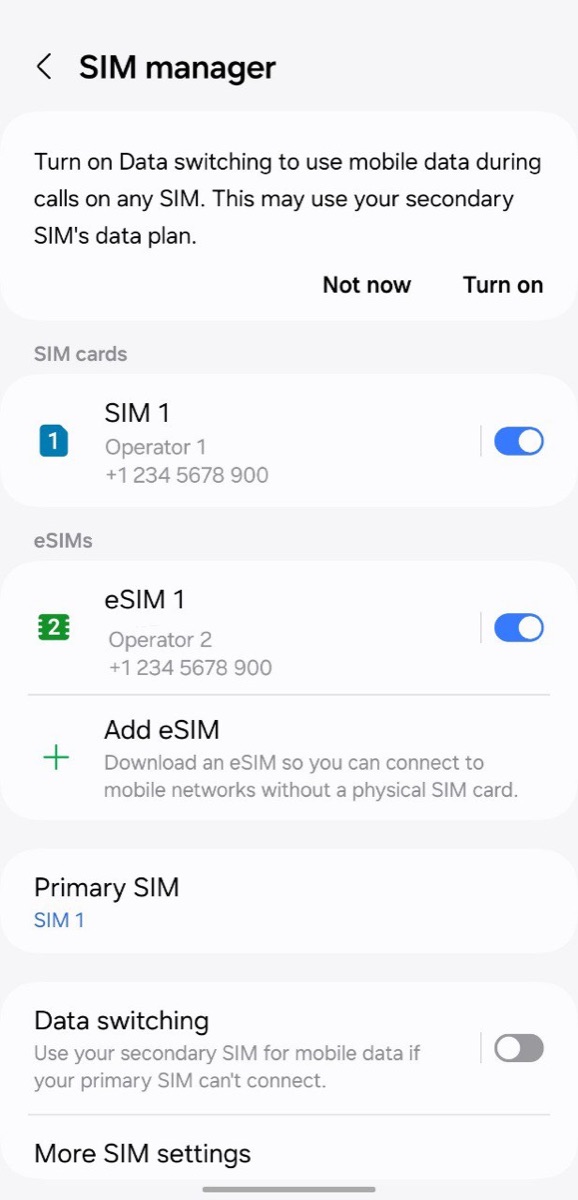
Settings › Connections › SIM manager › Add eSIM
One field, whole string
Samsung asks for a single activation code. Type the whole string: LPA:1$, the SM-DP+ address, another $, then the code. Typing the address alone fails.

Google Pixel
Settings › Network & internet › SIMs
Pixel: same idea
Tap Add eSIM. The QR scanner screen has an option to type a code instead of scanning. Pixel also expects the full LPA:1$… string in one field.
LPA:1$address$code.More Android detail, including Xiaomi and Motorola menu names, is in how to activate an eSIM on Android and the two-platform eSIM setup guide.
Which SM-DP+ address does a YonoSIM eSIM use?
We counted every eSIM we have delivered. Of the 426 profiles issued from 14 April to 3 November 2026, all came from one of three SM-DP+ hosts:
| SM-DP+ address | eSIMs delivered | Share |
|---|---|---|
rsp-eu.simlessly.com | 422 | 99.1% |
rsp1.cmlink.com | 3 | 0.7% |
esiminfra.toprsp.com | 1 | 0.2% |
Two more facts from the same records. Every one of those 426 strings had exactly three parts, so none required a confirmation code. And 424 of the activation codes were 32 characters long, which is why typing one by hand is error-prone and why copy-paste beats retyping.

Why the SM-DP+ host matters
- A wrong host fails silently. One extra character and the phone reports that the code is invalid or that it cannot reach the server. Check the host before you blame the code.
- It tells you whose eSIM it is. If an install string you are holding points at a host you do not recognise, it came from someone else. For a YonoSIM order, expect one of the three hosts above.
- It does not tell you the network. The SM-DP+ is the platform that delivers the profile. The network you connect to abroad is chosen by the profile itself, so two eSIMs from the same host can use different carriers.
- It needs the internet. Your phone downloads from the server, so install on Wi-Fi before you fly, not in the arrivals hall.
Troubleshooting manual entry
| What you see | Most likely cause | Fix |
|---|---|---|
| Invalid code / unable to add | Host typed with https:// or a space | Type the bare host only |
| Code no longer valid | This profile was already downloaded once | Ask your provider for a new eSIM |
| Cellular plan cannot be added | Phone is carrier-locked | Check Carrier Lock in Settings › General › About |
| Nothing happens on Android | Only the code was typed | Type the full LPA:1$host$code string |
| Download stalls | No internet connection | Join Wi-Fi and try again |
If the phone itself is the problem, the checks in is my phone eSIM compatible? take a minute, and the full model list lives on our compatible devices page. Once the eSIM is installed, the last step people miss is roaming. Our guide to data roaming on or off covers that.

FAQ
QWhat is an SM-DP+ address?
AThe SM-DP+ address is the internet address of the server that stores your eSIM profile until your phone downloads it. It looks like a website hostname, for example rsp-eu.simlessly.com. Your phone contacts that server, presents the activation code, and installs the profile. SM-DP+ stands for Subscription Manager Data Preparation, and the plus marks the consumer version defined in the GSMA's SGP.22 eSIM specification.
QWhere can I find the SM-DP+ address and activation code?
ABoth are inside the eSIM QR code your provider sent you. Most providers also print them as text next to the QR, often as one string in the form LPA:1$<SM-DP+ address>$<activation code>. The part between the first and second $ is the SM-DP+ address, and the part after the second $ is the activation code. YonoSIM shows both values separately in the install email and on your plan page.
QHow do I enter the SM-DP+ address on an iPhone?
AOpen Settings, tap Cellular (or Mobile Data), tap Add eSIM or Add Cellular Plan, then tap Enter Details Manually at the bottom of the QR scanner. Type the SM-DP+ address into the first field and the activation code into the second. Leave the confirmation code blank unless your provider gave you one.
QIs the SM-DP+ address the same for every eSIM?
ANo. Each eSIM provider or platform runs its own server. Every one of the 426 eSIMs YonoSIM delivered between 14 April and 3 November 2026 came from one of three hosts, and 422 of them from rsp-eu.simlessly.com. The activation code is what is unique to your eSIM; the SM-DP+ address is shared by many customers of the same platform.
QCan I reuse an SM-DP+ address and activation code?
AUsually not. The activation code points at one profile, and once a phone has downloaded it the server normally will not hand it out again. If you delete the eSIM, the same code typically fails with an error such as 'This code is no longer valid'. Contact your provider for a new profile instead of re-scanning.
QWhat is the SM-DP+ address for Verizon or T-Mobile?
ACarriers give you their SM-DP+ address with your own activation code, in the activation email, the carrier app, or from a store agent. Neither Verizon nor T-Mobile publishes one on an official page we could find, so treat any address copied from a forum with suspicion, and ask the carrier for the full activation code instead.
Related guides
- What is an eSIM and how does it work?
- What is an EID number?
- IMEI vs EID vs ICCID
- What is an ICCID number?
- Is my phone eSIM compatible?
- Does an eSIM have a phone number?
- Is my phone carrier-locked?
- eSIM compatible devices (full list)
- How much data do I need for travel?
- How to check data usage on iPhone and Android
- Can you hotspot a travel eSIM?
- What does airplane mode do?
- eSIM setup on iPhone and Android
- How to activate an eSIM on iPhone
- How to activate an eSIM on Android
- Data roaming on or off?
Originally published on www.yonosim.com/en/blog/what-is-sm-dp-address-esim-2026 · YonoSIM — You Only Need One SIM