

Is My Phone eSIM Compatible? 3 Checks in Settings That Take a Minute (2026)
Your phone supports eSIM if Settings offers an Add eSIM option or if dialling *#06# shows an EID. For a travel eSIM it must also be carrier-unlocked. Here are the three checks for iPhone, Pixel and Samsung, the regional variants that fail them, and what to do if yours does.

Published November 3, 2026·6 min read
30-day auto-refund on no usageSummary
Your phone is eSIM compatible if Settings offers an “Add eSIM” option, or if dialling *#06# shows an EID. For a travel eSIM it must also be carrier-unlocked, which on iPhone shows as “No SIM restrictions” under Settings › General › About.
Every iPhone since the XS and XR and every Pixel since the Pixel 4 passes the first check, except some China-mainland and Hong Kong models. To look up an exact model, search our list of eSIM compatible devices.
Is my phone eSIM compatible? The three checks
| Check | Where | Pass looks like | Proves |
|---|---|---|---|
| 1. Settings | iPhone: Cellular. Pixel: Network & internet › SIMs. Samsung: Connections › SIM manager | An Add eSIM option | The phone has eSIM |
| 2. Dial *#06# | Phone app keypad | A row labelled EID | The eSIM chip exists |
| 3. Carrier lock | iPhone: General › About › Carrier Lock. Android: ask your carrier | No SIM restrictions | It accepts other companies' eSIMs |
How to check if your phone is eSIM compatible on iPhone
iPhone
Settings › Cellular
Check 1: is this row here?
If you see Add eSIM (older iOS: Add Cellular Plan), the iPhone supports eSIM. In many countries the menu reads Mobile Data instead of Cellular.
Apple supports eSIM on every iPhone from the XS, XS Max and XR onward, and from the iPhone 13 two eSIMs can be active at once. Two regional footnotes from Apple's own pages: in China mainland only a handful of recent models support eSIM, and in Hong Kong and Macao certain models use two physical nano-SIM slots instead. If you bought your iPhone in either place, run the check rather than assuming.
How to check eSIM compatibility on Android
Google Pixel
Settings › Network & internet › SIMs
Pixel: look for Add eSIM
On some Android versions the option reads Download a SIM instead? after tapping Add. Either wording means the phone has an eSIM chip.
Samsung Galaxy
Settings › Connections › SIM manager
Samsung: SIM manager
An eSIMs section with Add eSIM means yes. If SIM manager only lists SIM card slots, that Galaxy variant has no eSIM.
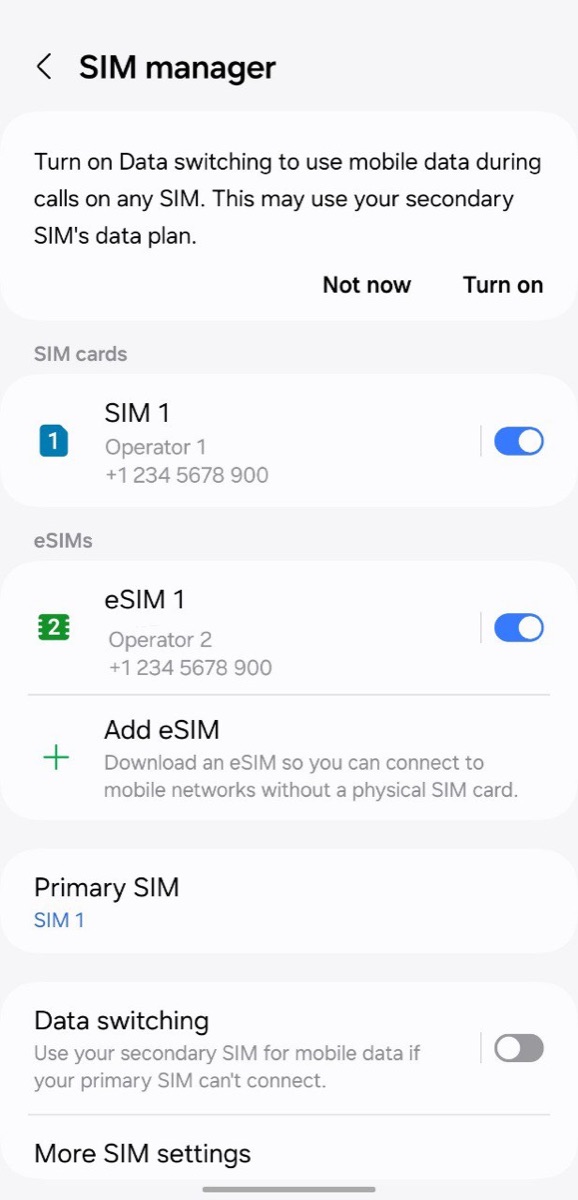

Other Android brands use their own menu names for the same screen. Type “eSIM” into the search bar at the top of Settings. If nothing comes up, use check 2.
The *#06# trick
Open the phone app, switch to the keypad, and type *#06#. No need to press call. A box pops up with the phone's identifiers. If one of them is labelled EID, the phone has an eSIM chip. If you see only IMEI numbers, it does not. Samsung notes the code works where the carrier supports it, so a blank result means “use Settings”, not “no eSIM”.
Any phone
Phone app › keypad › dial *#06#
Device Info
- EID
- 8904 XXXX XXXX XXXX XXXX XXXX XXXX XXXX
- IMEI
- 35 XXXXXX XXXXXX X
- IMEI2
- 35 XXXXXX XXXXXX X
Check 3: is the phone carrier-unlocked?
iPhone
Settings › General › About
Check 3: unlocked?
Apple: if No SIM restrictions appears next to Carrier Lock, the iPhone is unlocked and will accept a travel eSIM. A carrier name here means it will not.
A phone can support eSIM and still refuse yours. Phones sold on contract are often locked to the carrier that sold them, and a locked phone rejects any other company's SIM or eSIM. Android has no universal lock indicator, so ask your carrier, or try a friend's SIM from another network. Carriers typically unlock a phone once it is paid off, but it can take days, so ask before the trip. The lock is tied to the handset, which is why it lives next to the IMEI. The country-by-country rules and the 2026 US carrier policies are in is my phone carrier-locked?
eSIM compatibility by brand and year
The rule of thumb by manufacturer. The full, searchable model list, including tablets and watches, is on eSIM compatible devices.
| Brand | eSIM from | Watch out for |
|---|---|---|
| Apple iPhone | XS / XR (2018) and later | China mainland models; some Hong Kong and Macao models |
| Google Pixel | Pixel 4 (2019) and later; Pixel 3a mostly | Pixel 3a bought with Verizon or in Japan |
| Samsung Galaxy | S20 (2020) and later flagships; Z Fold / Flip from 2021 | China mainland and Hong Kong variants; many budget A models |
| Xiaomi | 13 series and later, in some regions | Mainland China variants |
| OnePlus | 11 and later, OnePlus Open | Models before the 11 |

Why a “compatible” phone can still fail
| Symptom | Likely cause | What to do |
|---|---|---|
| No Add eSIM option at all | Regional variant without eSIM, or old software | Update the OS; check the model on our device list |
| eSIM installs, then no signal abroad | Data roaming off on the eSIM line | Turn Data Roaming on for the travel eSIM only |
| Cellular plan cannot be added | Carrier lock | Ask your carrier to unlock |
| Code no longer valid | Activation code already used | Ask the provider for a new eSIM |
| Signal but no internet on Android | APN not filled in | Enter the APN shown on your plan page |
The roaming row catches most people: the travel eSIM line needs Data Roaming on, your home line needs it off. See data roaming on or off. And if installation is the stuck step, the SM-DP+ address guide covers typing the code by hand.

If your phone is not eSIM compatible
- Buy a local physical SIM on arrival. Usually cheap, though airport kiosks charge more and many countries require you to register it with your passport.
- Use a pocket Wi-Fi. Works with any phone, but it is one more device to charge.
- Use your carrier's roaming pass. Simplest, usually the most expensive per gigabyte.


FAQ
QHow do I check if my phone is eSIM compatible?
AOpen Settings and look for an option to add an eSIM: Settings > Cellular > Add eSIM on iPhone, Settings > Network & internet > SIMs on Pixel, or Settings > Connections > SIM manager on Samsung. If it is there, the phone supports eSIM. You can also dial *#06#: if an EID appears, the phone has an eSIM chip.
QIs my iPhone eSIM compatible?
AEvery iPhone from the XS and XR (2018) onward supports eSIM, according to Apple. The exception is iPhones sold in mainland China, where Apple lists only a few recent models with eSIM. Some Hong Kong and Macao models use two physical SIM slots instead. For travel it must also show 'No SIM restrictions' next to Carrier Lock in Settings > General > About.
QWhich Google Pixel phones support eSIM?
AGoogle says all Pixel 4 and later phones work with eSIM. The Pixel 3a works unless it was bought with Verizon service or in Japan. Older Pixels are limited: Pixel 3 only in some regions and carriers, Pixel 2 only with Google Fi, and the original Pixel not at all. In the US, the Pixel 10 series has no physical SIM slot.
QMy phone supports eSIM but the travel eSIM will not install. Why?
AThe most common reason is a carrier lock: a phone bought on contract can refuse another company's eSIM. On iPhone check Settings > General > About > Carrier Lock. Other causes are no Wi-Fi during the download, an activation code that was already used, or outdated software. Ask your carrier to unlock the phone before you travel.
QDoes dialling *#06# work on every phone?
AIt shows the IMEI on almost every phone, and on iPhones and most recent Android phones it also shows the EID. Samsung notes that the code depends on carrier support, so if nothing appears, use the Settings check instead. No EID on either is the clearest sign the phone has no eSIM chip.
Related guides
- What is an eSIM and how does it work?
- What is an SM-DP+ address?
- What is an EID number?
- IMEI vs EID vs ICCID
- What is an ICCID number?
- Does an eSIM have a phone number?
- Is my phone carrier-locked?
- eSIM compatible devices (full list)
- How much data do I need for travel?
- How to check data usage on iPhone and Android
- Can you hotspot a travel eSIM?
- What does airplane mode do?
- eSIM setup on iPhone and Android
- How to activate an eSIM on iPhone
- How to activate an eSIM on Android
- Data roaming on or off?
Originally published on www.yonosim.com/en/blog/is-my-phone-esim-compatible-2026 · YonoSIM — You Only Need One SIM